

deepin is a Linux distribution devoted to provide beautiful, easy to use, safe and reliable system for global users.
deepin 15.4 Beta has the newly designed Control Center, and it installed a series of Deepin Original Applications. It is easy to use with great beauty and has improved the user experience a lot. Besides, the kernel version has been upgraded to the latest stable version, it has improved the stability and compatibility. Due to the active feedback from alpha test users, deepin 15.4 beta has an outstanding improvement on completeness and compatibility.
Now let's view some of the concerned changes!
New Control Center Makes it So Easy for Settings
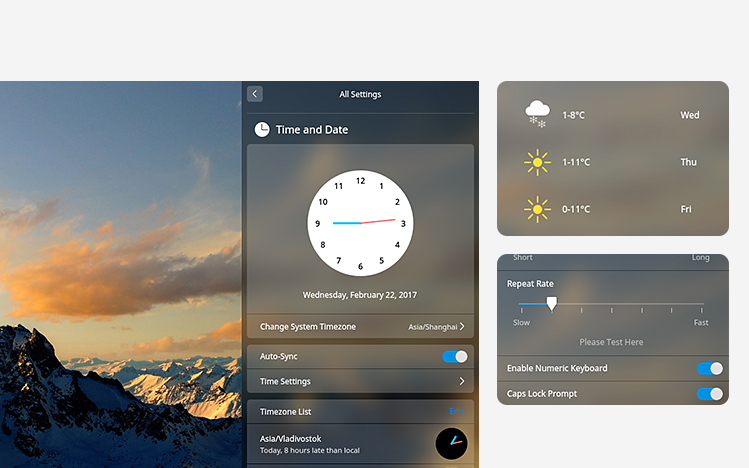
The control center has rewritten and redesigned, it has weather, notifications and convenient operations, etc. in homepage and it becomes easy to change the settings, and it makes more perfect for the system with brand new interaction and design.
Brand New Installation Interface to Enjoy in a Cup of Tea Time
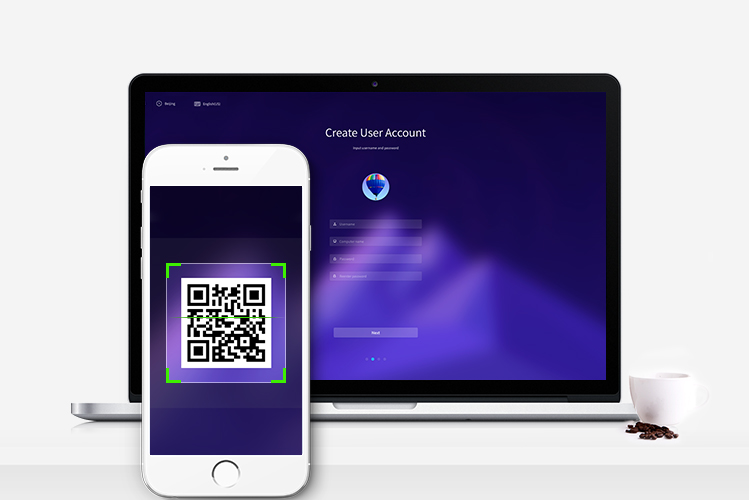
We have integrated the new Deepin Installer 2.0 with brand new install interface, smart detection for installation,helpful tips and scan QR code to feedback to let you enjoy the installation process.
Upgrade the Kernel to Get More Support
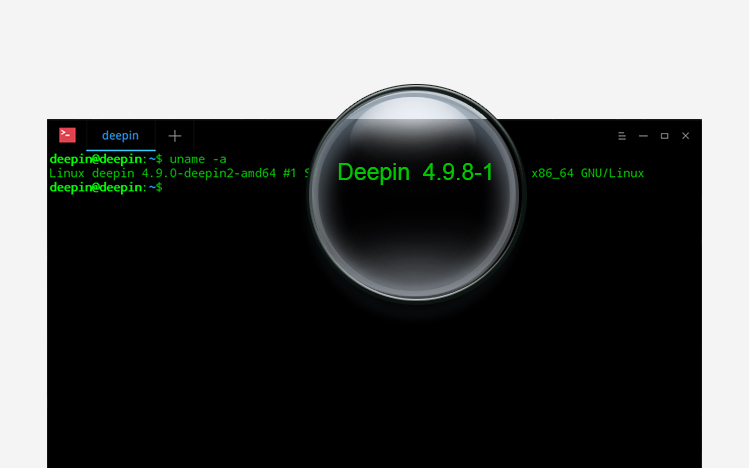
We upgrade the kernel to the latest 4.9.8 version to get stability and compatibility; It has more drivers and hardware support to satisfy the Intel 6th/7th gen CPUs.
Redraw the Symbol Fonts to Say Goodbye for Popup Hints
We have redrawn and integrated MT Extra and webdings symbol font for WPS to let you enjoy the editing process without worrying about the popup hints for fonts.

We Concerned About User Feedback
At the same time, we have added some tiny and elegant functions, optimized and unified the style for the system, detailed are:
- Added multi-touch support(4 fingers, 5 fingers for part of the devices) for touchpad;
- Added quick access bar at the bottom of the homepage of the control center;
- Added function for recording/setting Numlock status;
- Added navigation module for Control Center;
- Added blur effects for opened windows effects;
- Added proxy settings for Control Center;
- Unified the interface of message management, dialog and notification box for Control Center;
- Optimized TTY mode and set the default language as English;
- Optimized the scrolling effects for Control Center;
- Optimized window manager V2.0 to make the animation more accurate and smooth;
- Upgrade Deepin Boot Maker to latest version;
- Upgrade QQ to latest version;
- Update the icon style for OSD;
- Fixed the issue that the weather always shows "Wuhan";
- Fixed the issue that it does not try to get the latest weather automatically;
- Fixed memory leak issues;
- Fixed the bug that genymotion cannot load virtual machine;
- Fixed the bug that failed to connect to Wi-Fi network in dock;
- Fixed problems in alpha test and user reported problems;
Please download deepin mirror and watch video tutorial. With Deepin Boot Maker, you can easily install the system in your computer.
Official Downloads:
64bit: click to download (MD5 hash: e679dc41a0220566e763e116fdf4fd3a)
deepin 15.4 will not provide 32 bit ISO image for community versions, etc. If you need to get them or ask for commercial support, please send email to [email protected].
Other downloads:
Reminder:
- The Beta edition has many known problems and imperfect functions. It is not recommended to use it as main system in work environment and daily use.
- Please fill the "deepin 15.4 Beta Testing Questionnaire" to improve our system in 2017/02/27~2017/03/13.
Open Source to Share Joy
deepin is an open source desktop system developed for common users. You are free to download, distribute, modify and use it.
GitHub: https://github.com/linuxdeepin
Welcome to follow us on Twitter and Facebook to acquire latest update in the first time. Also welcome to join our forum to communicate and share your joy with us.
At last, we solemnly thank those community teams and companies who have provided testing, documentation, translation and mirroring support. You have made open source better with the selfless contribution!
竟然没有人评论吗?
能不能精简一下体积,2gU盘装不了
开箱即用的理念不变哈,现在2g u盘很少见了,换个大容量的。
漩涡系统隔绝空间,底层人民生活艰苦。
希望深度的新版本的系统做的更加全面,预装的软件更加的多。但是不要集成那个虚拟机,我们支持原生的深度系统。系统安装包达到十个g左右,把一些常用的软件全部都安装好,省的还要我们自行安装。做成简单快速装机版多好啊!
15.3可以升级至15.4正式版吗?好像新版本改动量很大
正式版可以。
板凳
把我顶上去
好激动
界面很美观 之所以安装深度不装 ubuntn 就是因为 ubuntu 界面太难看
更重要的是深度自己开发的软件很好用 完美运行 QQ 也很不错 赞一个
另外 Elementary OS 的界面也很优雅
我在用EOS
可以试试deepin。
就感觉deepin的控制台太丑了,所以一直还在用EOS
我之前装了EOS,无法换源,那个pubkey怎么解决?不能安装QQ这些功能,没法日常用啊,网上的方法都过时了,没研究过这个
ubuntu自己 好好美化一下还是不错的
直接试用,不多说!
666
火钳刘明!
还是15.4啊?现在都17年了呢。。
15 版本之后不再用年份命名了。https://www.deepin.org/developer-community/planning/
我是来大大飞机的
15.3怎么升级?
15.3 升级需要等正式版,15.4 beta安装后 支持滚动更新到15.4 正式版。
请问15.4正式版大概要啥时候发布?
https://www.deepin.org/developer-community/planning/ 大概在4月
赞赞赞赞赞赞赞,支持深度,真心好看好用!!!
如果可以从beta直接滚动到正式版,那么正式版推出后,更新到beta会不会出现一些莫名问题?
更新到beta? 现在的iso就是beta版本,更新就是rc 再更新就是release了
高分辨率屏幕 解决了吗?这段时间眼睛快瞎了
高分辨率的优化在年中计划。。
占个位儿
这是几楼啊啊
好想把我使用的电脑升级了
快快行动起来。。
望天~~
快拿小板凳,马上升级嗑瓜子。
小白,待你长发及腰,嫁我可好?
加油deepin
建议主要方向应该是高分辨率的支持,, 现在的电脑屏幕都开始高分化了,, 看久了眼睛疼.
下一步计划优化高分屏了。
刚装完
恭喜深度!!!新版的看着太漂亮了~~
正准备把deepin的32位系统换成64位的时候,15.4版出来了,好哇,赶紧试一试,终于来了新版本。
什么时候支持树莓派?
这个暂时还没有计划。
V5,还好没放弃,终于等到你。希望这次安装成功后,能成功进入系统。
赶紧下载试试
怎么升级安装呢?原有系统装了很多东西,不好都重装吧
beta集成了新的安装器和内核,需要下载beta iso安装,正式版和beta之后提供滚动更新升级。
下好就赶紧装虚拟机上试了试,确实很惊喜,看了看15.3上有的问题也修复好了。不过看时间时发现了个问题,在0:55时,表盘的时钟直直的指向数字12,开始还以为是时间慢了,但看了数字时钟后才发现是bug。难道我是个例?
你好,这个问题发beta后就修复了。
华硕n5517600p安装deepin 15.4的时候安装不了,集显是r7 ,独显是r9280x 安装的时候必须在安装那里禁用显卡(acpi_osi=linux radeon.modeset=0 xforcevesa) 然后才能安装 安装完选择启动项的时候也需要禁用显卡 命令同上 登陆系统之后 系统界面很大 而且分辨率只有800*480,笔记本分辨率是1080p的,而且在下次重启的时候会出现grub错误。
跑lnmp或lamp脚本的时候,总是装不来,或者把系统搞爆炸
啦啦啦
下载太慢了,居然需要4天才下载完,要死人的
什么网络。
RX480使用HDMI输出的时候,会没有声音,不知道怎么回事,蓝宝石RX480超白金4G版。怀疑是不是驱动的原因,因为用Ubuntu16.04装官方驱动输出正常。
麻烦社区反馈下具体信息,谢谢。
最近硬盘格式化,马上安装上瞧瞧。
我还爱玩的麻将连连看 升级到15.1版本后就没有了,建议恢复。
软件更新希望也跟上,有道词典还是 2015-12-30 发布的版本。
有道词典只有这一个版本,deepin和有道联合开发的。觉得版本低可以用crossover
希望能设置鼠标第4,第5个按键
校验MD5值是对的,但启动硬盘镜像和启动深度工具制作的U盘都到左上角一个光标闪烁就不动了。怎么回事
麻烦去社区具体反馈下安装过程和硬件配置。
是不是与只有2G内存有关,另一台有4G内在存的笔记本能继续下去
现在的硬件几乎都是比较高的配置了,32位就要放弃了,专心64位的。
WIFI可快速连上了
我就想知道它支持像cad.ps等等一系列的设计软件吗?求大神回复联系qq193013033,谢谢!
你好,现在这些专业应用没有linux版本,可以使用 gimp 等替代。
cad对应的linux应用应该是freecad
然后ps对应的才是gimp.
为什么我下载的是英文的?
iso不区分中英文啊,你是在安装界面选择语言为英文吗?
我现在就在用deepin15.4的啊,很好用啊,界面奢华漂亮,不要选择安装器安装,那个是体验版.要用优盘安装的方法安装,很方便几乎等于一键安装....deepin永远支持,这绝对是国内最好的了,比什么红旗 麒麟啥的好上不知多少倍
希望在新版本中能恢复 kshisen_4.13.1-0ubuntu0.1_amd64 这个麻将连连看小游戏。
jingle@jingle:~$ apt-cache search kshisen
kdegames-mahjongg-data - tilesets and backgrounds for Mahjongg games
kdegames-mahjongg-data-kf5 - tilesets and backgrounds for Mahjongg games
kshisen - Shisen-Sho solitaire game
最好一个是的吗
正在下载,看在我台式机中试试.....
正在下载 ,准备先在虚拟机中体验一下。
Hi,
How to open file manager as root?
Please...
Thanks.
Deepin File Manager 1.4 will add the function.
最新版我安装了,QQ虚拟机出错,一直弹出错误窗口,我卸载qq后,软件商店里也没有了。
麻烦去社区反馈下 录屏或在截图 严格来说卸载QQ不会卸载商店
建议wps能改进一下,能有windows下的云功能。
这个也要看wps linux的支持了。
现在发布的是beat版,正式版的大概什么时候推出?如果直接使用update或在设置内升级的话,vmware会不会不能用?
https://www.deepin.org/developer-community/planning/ 版本规划,正式版vm可以用的额
正式版大概4月份的时候出哦。15.3正式版本可以直接update升级到15.4正式版,15.4beta版本也是可以update升级到正式版的。
听说新出的锐龙需要4.10.内核,用户要自己升级,希望深度给做个锐龙专版,对用户来说会非常方便
我用硬盘安装器安装 咋把我硬盘的引导都给改了??????
能说明下具体操作吗?