

deepin is a Linux distribution devoted to provide beautiful, easy to use, safe and reliable system for global users.
deepin 15.4 Beta has the newly designed Control Center, and it installed a series of Deepin Original Applications. It is easy to use with great beauty and has improved the user experience a lot. Besides, the kernel version has been upgraded to the latest stable version, it has improved the stability and compatibility. Due to the active feedback from alpha test users, deepin 15.4 beta has an outstanding improvement on completeness and compatibility.
Now let's view some of the concerned changes!
New Control Center Makes it So Easy for Settings
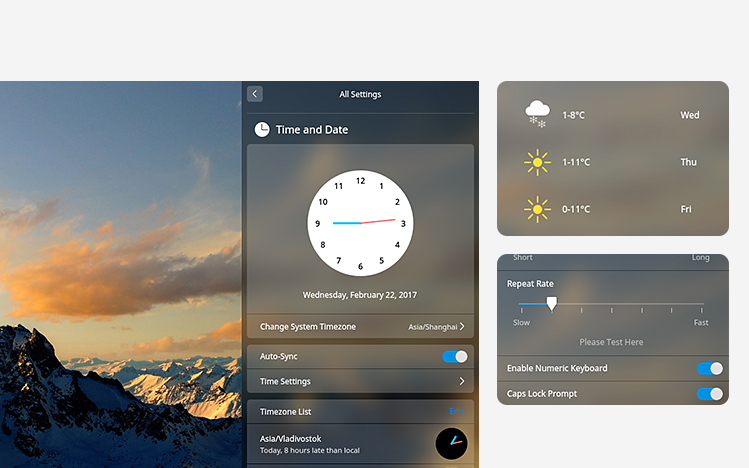
The control center has rewritten and redesigned, it has weather, notifications and convenient operations, etc. in homepage and it becomes easy to change the settings, and it makes more perfect for the system with brand new interaction and design.
Brand New Installation Interface to Enjoy in a Cup of Tea Time
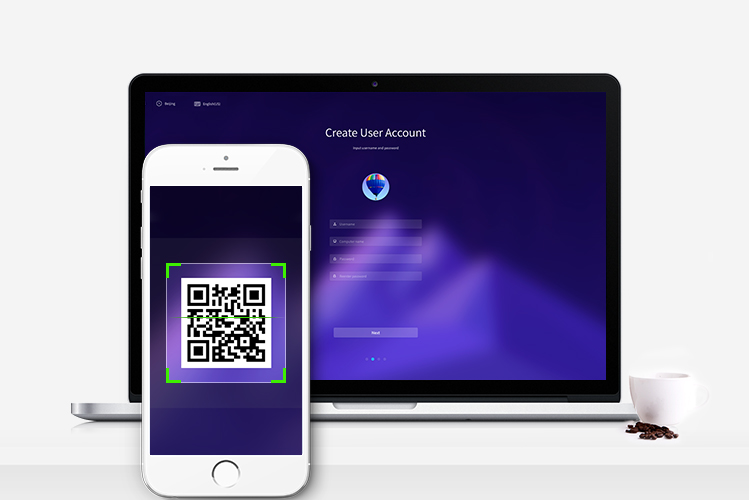
We have integrated the new Deepin Installer 2.0 with brand new install interface, smart detection for installation,helpful tips and scan QR code to feedback to let you enjoy the installation process.
Upgrade the Kernel to Get More Support
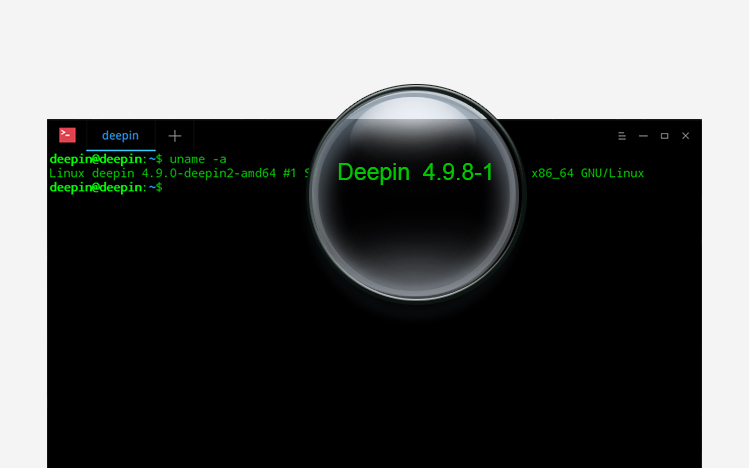
We upgrade the kernel to the latest 4.9.8 version to get stability and compatibility; It has more drivers and hardware support to satisfy the Intel 6th/7th gen CPUs.
Redraw the Symbol Fonts to Say Goodbye for Popup Hints
We have redrawn and integrated MT Extra and webdings symbol font for WPS to let you enjoy the editing process without worrying about the popup hints for fonts.

We Concerned About User Feedback
At the same time, we have added some tiny and elegant functions, optimized and unified the style for the system, detailed are:
- Added multi-touch support(4 fingers, 5 fingers for part of the devices) for touchpad;
- Added quick access bar at the bottom of the homepage of the control center;
- Added function for recording/setting Numlock status;
- Added navigation module for Control Center;
- Added blur effects for opened windows effects;
- Added proxy settings for Control Center;
- Unified the interface of message management, dialog and notification box for Control Center;
- Optimized TTY mode and set the default language as English;
- Optimized the scrolling effects for Control Center;
- Optimized window manager V2.0 to make the animation more accurate and smooth;
- Upgrade Deepin Boot Maker to latest version;
- Upgrade QQ to latest version;
- Update the icon style for OSD;
- Fixed the issue that the weather always shows "Wuhan";
- Fixed the issue that it does not try to get the latest weather automatically;
- Fixed memory leak issues;
- Fixed the bug that genymotion cannot load virtual machine;
- Fixed the bug that failed to connect to Wi-Fi network in dock;
- Fixed problems in alpha test and user reported problems;
Please download deepin mirror and watch video tutorial. With Deepin Boot Maker, you can easily install the system in your computer.
Official Downloads:
64bit: click to download (MD5 hash: e679dc41a0220566e763e116fdf4fd3a)
deepin 15.4 will not provide 32 bit ISO image for community versions, etc. If you need to get them or ask for commercial support, please send email to [email protected].
Other downloads:
Reminder:
- The Beta edition has many known problems and imperfect functions. It is not recommended to use it as main system in work environment and daily use.
- Please fill the "deepin 15.4 Beta Testing Questionnaire" to improve our system in 2017/02/27~2017/03/13.
Open Source to Share Joy
deepin is an open source desktop system developed for common users. You are free to download, distribute, modify and use it.
GitHub: https://github.com/linuxdeepin
Welcome to follow us on Twitter and Facebook to acquire latest update in the first time. Also welcome to join our forum to communicate and share your joy with us.
At last, we solemnly thank those community teams and companies who have provided testing, documentation, translation and mirroring support. You have made open source better with the selfless contribution!

下载中。。。 准备好好体验一把
今天看新闻了解到了Deepin, 就装了个虚拟机试用了,这界面太漂亮,而且很多实用的软件,支持支持!
谢谢支持
只能全新安装吗
beta只能全新安装,之后可以升级rc release
请问一下,Windows平板可以用吗?
应该是可以的,官方没有做适配,可以试试。
直接安装就行?
下载iso后 启动盘制作工具制作启动u盘就可以安装了。
想问可以和Windows 弄双系统吗?
可以的
好用,支持
以前那种安装器在哪儿啊,就是win下,直接安装的安装器
http://cdimage.deepin.com/applications/deepin-boot-maker/windows/
最下面那个
I tried this out earlier and things have come along greatly in terms of usability. I was very impressed as a long time user of linux until I clicked update and the screen was replaced by an update screen and a message saying updating please don't unplug your computer.. I could not use the desktop while this was happening. This is the 1st time I've ever seen such an awful feature in use on a Linux distro..
I was absolutely horrified!! One of the great things about Linux is that you can carry on working while you update your computer.. Why on earth would you drag one of the worst issues with Windows into a Linux distro?? It's the thing Windows users hate most about Windows! After the update completed the computer restarted without my consent! and all work was lost!.. I am absolutely appalled and immediately removed Deepin from my machine.
Really sorry to bring your troubles. What did you use, deepin15.3 or deepin 15.4 beta? Do you enable the auto-update feature?
装完之后开机到要输入密码登录那个界面,光标在密码框会闪几下,大概2秒,闪几下之后就会整个卡住,键盘什么的完全失灵,只能硬重启。如果在光标在密码框闪烁的那2秒之内抓紧时间输入密码回车就能进去,如果手慢了,即使输进密码回车也会卡在转圈圈的地方进不到桌面。
麻烦反馈下硬件信息。
笔记本HP431,i3-2330M,HM65主板,HD3000核显,ATI7400M独显,4G三星内存。进到输密码框那,光标在密码框闪烁6下,然后整个就卡住了,换USB键盘也没反应。
麻烦社区去反馈下,然后tty反馈下日志。
小白,不会反馈日志什么的。重装后设置了自动登录就没问题了。
Hi. It would be good if you could add a right-click "Open as root" command in Deepin File Manager, like Nemo has. It is very useful sometimes, easier to work with than in the case of "Open in Terminal".
the deepin file manager v1.4 will be supported.
Great. You are developing a excellent operating system, with a unique look and feel. I like even the way the updates are made. By disabling the auto-update feature it is easy to avoid the unpleasant situation reported by fatriff. We always have to pay attention to settings.
Thank you. Keep up the good work 🙂
Just one more thing. Too bad that you didn't implement the PPA support (as I remember you said you will, when the new Deepin 15 series, based on Debian, started ; I hope I'm not wrong). I don't know if it is possible to insert the necessary Ubuntu components into the current Debian base, but a Deepin OS having also PPA support would have been perfect.
Are you all going to bring back the LiveDVD like most distros have?
我想说,什么时候能优化高分屏,界面太小看着眼睛太累了
年中计划,再等等。
做的太棒了!忍不住评论一波,要不是为了玩联盟,都想装这个啦
之前就装过,win和deepin双系统。但是迫于没有快速启动。还是装回win了
deepin还可以戒掉游戏网瘾,嘻嘻
之前就装过,win和deepin双系统。但是迫于没有快速启动。还是装回win了
lol和ps可以完美运行吗~可以就抛弃win了
lol和ps都是win下的软件。linux下就算用crossover和wine都没办法完整支持。因为牵扯到的库太多了。
开发者您好:
我的电脑是T61,必须启动Thinkfan才安全,不然温度太高了会烧毁机器内的东西,一般是烧坏键盘。
所以我希望15.4能允许thinkfan这个软件能够运行,
我非常喜欢深度linux,但是因为不能启动thinkfan所以装了15.3又赶紧卸载了,不然会烧毁我的键盘甚至硬盘。
急切希望15.4解决thinkfan不能运行(或者可能是开机不能自动启动)的问题。
好的,已经反馈了
倒不如直接扒mac的皮
W10 跟Deepin 双系统!软件有点少,,,战网也没找到,战网客户端?什么时间能有?守望先锋能玩就好了,优酷也没有?还要加油!
sudo apt-get install com.cibn.tv 试试这个 用的是youku的内容。
Deepin 系统 商城软件真心有点少?为什么少??要说有用户10亿,软件商家自然会上传软件!没软件只有系统。当然没人用,还有打字也不方便,比如我用的是,五笔拼音混合输入、五笔+拼音,同时用的,商成没有?
应用生态这个也需要用户起来后 厂商来支持。
大晚上不睡,给意见,为什么?
真爱
Installer crashes at final step.
Specific error display and paste the hardware configuration information
期待马上到来的15.4
deepin团队加油,
我对深度系统没有任何意见,只是HDMI无声音要解决,还有文件管理器无法访问网络共享
希望支持uefi安装,因为我有大于2T的硬盘,HDMI无声音,文件管理器无法访问网络共享
现在支持uefi安装,文件管理器1.4本周发布
Hello. A small (but annoying) issue to report : the icons created on desktop are not keeping their positions (established by user) after restart. So, after every restart the icons are vertically aligned in the left side of the screen.
准备下载一波,很漂亮!
manjaro-deepin用户飘过。。满意,啊哈哈
用安装器安装双系统,语言是英文的,而且每次登录都会变回英文,改掉语言要注销才能变成中文
不知道有没有人遇到过,15.3在输入密码的时候,不管什么地方输入。键盘键入速度过快的话,是输入不完整的,上次一直说我密码错误我一个个的慢慢敲才发现。不知道15.4能不能解决这个BUG
试试15.4 就知道。
深度系统桌面很像Mac os,希望深度系统能有自己的创新,在界面上的创新,而不是高仿Mac os。
提几个建议:
启动器作为一个类似ios文件夹那样的窗口打开,而不是全屏显示。为了尽可能多地显示图标,可以缩小行间距和图标大小。
当鼠标移动到任务栏的时间显示时,呈现一个时钟小窗口。
能快捷地读取U盘数据,当检测到U盘插入时提示打开,如果可能,希望能通过安装包安装windows软件。
能在底部快捷启动栏中建立文件夹。
能在桌面上放置小部件。
如果要模仿,应该把好的部分模仿下来:鼠标在底部任务栏上时图标大小随之灵动。
这个你在社区发帖了,很多还是在模仿ios和mac 但是直接安装win应用那也不可能。
华硕F3本子U盘安装的时侯过了LOGO后就卡光标那里了
按esc有反应嘛
没有反映,只能按ctrl+alt+dle重启
何时能够支持网银?
何时能够支持网银?
何时能够支持网银?
重要的事情说三遍,是时候出个浏览器了!
招行的支持wine了一个,crossover里面可以安装其他的
15.3正常装,15.4卡在安装界面DEEPIN过后,一个光标闪了好久
说下硬件配置
卡在66%无法继续安装!安装环境:intel nuc 骷髅峡谷6代+32G ddr4内存+三星 pm961nvme 1T+8G deepinlinux安装U盘,引导方式:gpt+uefi,安装方法:bios默认u盘启动,选择gpt空白分区高级格式化ext4,挂载/,安装。。。,卡死在66%。。。
我问下
只有进度值, 并不能定位到问题.
你可以切到 tty (Ctrl + Alt + F4), 然后定期地打印安装日志:
watch -n1 tail /var/log/deepin-installer-reborn.log
看看在日志里, 记录到什么操作出问题了. 有问题的话, 可以把日志贴出来.
七代华擎z270+i7700K+32G ddr4 3000海盗船+gtx1080+三星sm961 nvme 512g+8G deepin U盘;gpt+uefi;u盘启动,usb3.0接口黑屏,雷电3接口闪退重启。结论:对6/7代主板支持不如ubuntu,对gpt+uefi引导方式优化不够深入,硬件驱动相对滞后。。。一个好系统除了界面美观,更重要的是内在兼容性和稳定性,希望深度工程师加把劲!
你提到的 闪退重启, 是进行到哪一步才闪退的? 屏幕上有什么内容吗?
赞~\(≧▽≦)/~ 虽然部分驱动暂时还没有完善,但是冲这界面 我还是用了下来~
安装了15.3,想装15.4,安装方法和15.3一样吗?我是小白
一样的
希望深度的新版本的系统做的更加全面,预装的软件更加的多。系统安装包达到十个g左右,把一些常用的软件全部都安装好,省的还要我们自行安装。做成简单快速装机版多好啊!
希望深度的新版本的系统做的更加全面,预装的软件更加的多。但是不要集成那个虚拟机,我们支持原生的深度系统。系统安装包达到十个g左右,把一些常用的软件全部都安装好,省的还要我们自行安装。做成简单快速装机版多好啊!
希望深度的新版本的系统做的更加全面,预装的软件更加的多。但是不要集成那个虚拟机,我们支持原生的深度系统。系统安装包达到十个g左右,把一些常用的软件全部都安装好,省的还要我们自行安装。
还有能告诉我深度deepin的那个截图是怎么用吗?有快捷键吗?有快捷键的话是怎么按的?
做成简单快速装机版多好啊!
现在安装很简单啊,现在预装了很多必须的应用,控制中心有快捷键 默认 ctrl+alt+a